Hexa
A platform where you design, train and ship AI agents by connecting hexagons on a canvas, without writing code. The real challenge was never the model — it was the orchestrator.
- Role
- Product design & architecture
- Year
- 2026
- Status
- In production
- Stack
- React · Node · PostgreSQL · LLMs · Docker

Hexa came out of a specific frustration: every company we talked to wanted to "use AI", and none of them knew where to start. They weren't missing a model — GPT was one API call away. They were missing a way to describe their process and wire it to something that would run it.
So we didn't build another chat wrapper. We built a process editor.
The problem nobody names
When a company says "I want to automate customer support", what they're actually describing is about fifteen chained decisions: classify the message, search the knowledge base, decide whether there's enough context, escalate to a human if there isn't, draft the reply in the brand's voice, log the ticket.
A long prompt can simulate that. It can't guarantee it. The moment one of those fifteen decisions fails, you have no way of knowing which one.
The difference between a demo and a product is that the product tells you where it broke.
The architecture call
We separated three layers that almost everyone collapses into one:
- The graph — the declarative definition of the process. A versioned, diffable JSON that knows nothing about models or vendors.
- The orchestrator — an engine that walks the graph, resolves dependencies, handles retries and leaves a trace of every step.
- The executors — thin adapters per node type: LLM call, SQL query, webhook, transform.
That separation cost us time up front and paid it back many times over. Swapping model providers became configuration, not a refactor. And the day a client asked "why did the agent answer this?", we could show them the seven steps with their inputs and outputs.
The interface: hexagons, not boxes
The canvas uses hexagons for a reason that isn't aesthetic. A rectangle has four usable sides; a hexagon has six. In dense graphs — and real processes are dense — that measurably cuts edge crossings and lets the flow read without effort.
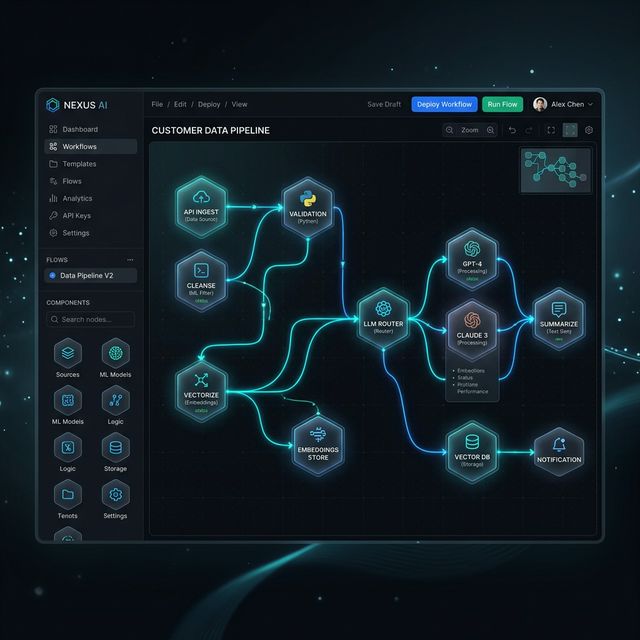
We also enforced an uncomfortable rule: no node may have hidden configuration. If something affects behavior, it's visible in the panel. We lost visual elegance and gained users who understand what they built.
What I'd do differently
- Versioning from day one. We added it in month four and migrating existing graphs hurt.
- Evaluation before features. We took far too long to build the automated test set. Without it, every prompt change was a gamble.
- Fewer nodes, better documented. Forty nodes sounds like power; in practice users touch eight and the other thirty-two cause paralysis.
Where it stands
Hexa runs in production with real clients in customer support, lead qualification and document processing. The part I'm proudest of isn't the canvas — it's that when something breaks, the user can see exactly where, without calling us.